Showing posts with label umpc. Show all posts

Friday, May 18, 2007

UMPC Triumphs over Pen and Paper...at least this once today

I hit a milestone today. I actually chose my UMPC over a nearby pen and paper. I was at client's store today overseeing the beta-launch of a new order management system. The store manager was using the system and suddenly offered up a great idea for a UI change. My instinct was too quickly locate a pen and paper to jot the thought down. My eyes caught a pen across the cash wrap but there was no paper in site. There were a few receipts but I thought better of confiscating any of those. In the moment, I realized that it would be both faster and better if I simply brought the Q1 out of standby and jotted the notes down in OneNote. And that's exactly what I did.

The significance of this only hit me later. Here was a perfect example of how the UMPC actually won out over a tried and true method of note taking. It occured to me that in order to win this particular battle, the UMPC had to meet the following criteria:

  1. Physically, the Q1 had to be more readily available than a pen and paper.
  2. The Q1 had to adapt to my environment (e.g. I was standing in a crowded and busy cash wrap.)
  3. The Q1 had to snap on from standby quickly.
  4. A method of text entry had to be immediately available (OneNote's side note).
  5. Text recognition had to be accurate and speedy.

In previous times, one or all of the requirements would not have been available. Either the device would have been too large to have warranted my picking it up as I headed over to the store, or the text recognition would have been too inaccurate. For me however, today was the first time that all these elements came together to create a successful note taking experience.

There were some rough spots and I want to capture those now:

  1. The cash wrap area was small and the counters were full with merchandise. This necessitated that I hold the Q1 in one hand and write with the other. While the Q1 is small, it is a bit too large to accomplish this task naturally.
  2. Hibernation. While my Q1 was in standby it could have easily gone into hibernation mode in which case the resume time would have been too slow and this use case would have failed. Lesson learned: the UMPC should be aware of its environment and usage. For example, accelerometers could tell it that it is being held. HID drivers could determine if the pen has been used recently or is being used. The UMPC could then use this information to prevent itself from going into hibernation until it was placed down again for some amount of time.
  3. OneNote defaulted to ink mode and not recognition mode. When I selected a place on the note, the TIP did not appear. This setting should be user configurable.

I'd like to end the post with the benefits of the Tablet over Paper:

  1. Because the cash wrap was crowded and busy, it necessitated that I stand and write. I would have had a difficult time trying to write down any notes on a single sheet of paper while standing. The Q1, while a bit bulky was imminently usable while standing.
  2. Because I use OneNote to take all my notes, I now have all the benefits associated with the notes being digital: they are searchable, can be integrated with Outlook Todo tasks, filed and emailed easily.
  3. I saved a tree.

Friday, May 11, 2007

A Response to a PC Magazine Editorial on UMPCs

Michael J. Miller, former Editor-in-Chief at PC Magazine recently wrote a blog entitled "Where an Ultra Mobile PC May Make Sense". In it he talks about his hands on experience with the new Samsung Q1 Ultra ultra mobile PC and how the unit with its smallish keys could not replace his notebook. The following is my response to his article.


I see your point but wanted to point out that the Samsung Q1 can easily be converted into a notebook pc in a matter of seconds using their organizer pack. I have one and use mine in this way all the time. A usage scenario goes something like this:

I get up in the morning and my Q1 is already connected to my 20inch Sony monitor. My bluetooth keyboard and mouse are automatically paired to the device when in range. I do my morning routine, check my email, my blog. Then I pack up my Q1 into its organizer case and head to a client. At the client, I simply open the organizer case and my Q1 is now a laptop. The case has a stand and keyboard built in. Later in the morning, I have a meeting at the client. I pop the Q1 out of the organizer case and head into the meeting. I take my notes unobtrusively using a pen with the Q1 resting on my leg. It is comfortable, quiet and natural. After the meeting, I head back to my moteling cube and pop the Q1 back into the organizer and resume my work. When I get home, I take the Q1 out of the case, plug in the monitor and I'm back to my desktop configuration.

I do this almost everyday. I use my Q1 as my desktop and notebook replacements and have the added ability of an ultra mobile tablet pc. This convergence has simplified my life: I don't have to keep files in sync and all of my files are with me all the time. I think as the technology matures, we will see the processing power and battery life of UMPCs increase dramatically. This will allow them to meet the needs of more people.

I'm pretty convinced that UMPCs are the way of the future, but hey I also bought the first Mac Luggable (weighing in at 16lbs.) and couldn't understand why people didn't get it!

Friday, May 4, 2007

The OQO 02 Represents a Tidal Shift in Computing

I don't think I have ever been this excited about a product...ever. Well, maybe that R2D2 remote control robot that I hounded my parents for for Christmas back in 1980 comes close. But those were the foolish antics of a child. I'm now a grown man yet acting like a child waiting for Christmas to arrive. Why?

There are a lot of reasons: It's sexy. It's cool. It's beautiful, no doubt. But the biggest reason is because it represents a tidal shift in computing and tidal shifts don't happen that often.

The computer industry has seen one other such shift and that was in 1984 when Apple introduced the first Mac. Remember that Super Bowl ad when the Mac was first introduced? The Mac ushered in an incredible change to the nascent consumer-oriented computer market. The excitement that the first Macintosh created back in 1984 was unique because it changed how we think about computers and how we relate to them. The computer was no longer for geeks and hobbyists. It was about fun and how everyday people could use one.

In the years since 1984 I haven't experienced anything remotely similar to the charge of excitement I felt when the original Mac rolled out. Yeah, we had the IBM Peanut (don't tell me you don't remember the Peanut). Yeah, we had the first Mac Luggable (the 16lbs. behemoth pictured at right that I still have tucked away in my garage). Yeah, we had the Palm. But nothing, not even from Apple has come close to that original excitement.

But I'm telling you that the OQO Model 02 is giving me that same level of excitement. It is exciting because the OQO represents that rare and significant shift that only occurs once every 20 years or so. The OQO model 02 is changing how we view and relate and ultimately how we're going to use computers. To date, we have been tethered to the desk. Our entire computing experience confined to the the desktop on which our monitor and/or laptop rests. Yes, the laptop is transportable but only from one flat surface to another. It is not mobile.

Our computing experience has not really changed since the first PC was introduced in 1981. 1981. 26 years ago. It has been 26 years that we have been tethered to the desk. Longer if you consider the first Apple and the Elf build-it-yourself kits. 26 years of innovation, yes. 26 years of incremental improvement, to be sure. But it's been 26 years focused on a singular computer use case: sitting at your desk.

Now along comes the OQO: A full featured, connected desktop computer, that fits in the palm of my hand. The OQO is the first desktop computer that I can literally pick up like a mobile phone and go on my way. The OQO isn't just transportable, it is ultra mobile. Its diminutive size means I can carry it with me all the time. I can have my entire desktop with me all the time. All my work files. All my media. All my email. All my contacts. All my client data. All my software. All my bookmarks. My entire computing experience is with me all the time. Having your entire computing experience with you all the time opens up exciting new use cases for computing. These are use cases that we have never seen and that have never been possible until today and that is exciting. Imagine how everyday things, things we take for granted, change...

" That presentation file isn't on my Blackberry and my co-worker really needs it right now to close the deal. I wish I were back at the office." No problem, you have your desktop PC and all your documents right there in your pocket. Find the file, edit it if you need to and send it right from your OQO. Isn't it nice not having to remember to sync?


"Oh no, the client called and said their servers went down. I better rush back to the operations center to restart them." Or, I can open a remote server terminal window on my OQO and login into the servers directly and take care of the problem.


"I'm going to be fired. I have a Skype call with those investors in 3 minutes and I'm stuck in traffic because that tanker truck hit the overpass and melted it and now I have to take this ridiculous detour." Thank God you can Skype in from your OQO and no one will know the wiser.


"Are you enjoying the Salmon darling? Hold on... What's that? What do you mean I checked in the wrong file and now the site is displaying pictures of the release party?!" Good thing you have your OQO and your entire development environment right in the palm of your hand. Comment out that easter egg line, recompile and repost right from the OQO then it's back to Salmon with wasabi ginger sauce.

I think you get the picture. The significance of this anytime/anywhere computing is so monumental (and I don't use that word lightly) that it is almost impossible to foresee all its implications. These examples only show how a small form factor device like the OQO will radically change the ways we already use the PC. The ultramobility of these devices will also usher in entirely new use cases for PC computing. New applications. New user interfaces. New computing experiences are waiting to be discovered.

What does it mean to our productivity, our interactions, how we work, play, socialize, entertain, relax when the PC is with you all the time. Think about how much time we spend behind our monitors now. How will those experiences change? What is the next killer app for these devices (and believe me there is one waiting to be discovered)? These questions excite me and for the first time, I (almost) have the product in my hands that will allow me to explore them.

Why am I so excited about my OQO? Because I can't wait for the future to arrive. The chance to be that guy who fixes the website and averts a crisis while at Aqua. Who restarts a downed server for the client while at the bookstore. Who forwards the presentation and saves the account while at the movies. Who wouldn't be excited to be that guy?

Tuesday, May 1, 2007

Broke Down… Ordered the OQO 02


After some deliberation I decided to break down and buy an OQO model 02.

Now I know, I just bought my Samsung Q1… actually, between the last blog posting and this one, I purchased another Samsung Q1 but this time the Q1p which is the upgraded Pentium M processor and memory (I gave my original Q1 to my sister). In any event, I love my Q1p. Really, it is a desktop and laptop replacement and I couldn't possible hope for anything better.

So why did I buy the OQO 02? Well, for one thing I had to. The thing is just too sexy. Another reason is that… oh forget it. There is no other reason. I won't pretend to have some "really good reason" for buying something so expensive after I have just purchased another something that was a little less expensive to replace an original spur of the moment purchase of something expensive that I didn't need.

The end result is that it will be arriving sometime in the next two weeks, provided OQO meets the scheduled and promised dates to get Vista-fied OQO's out the door next week. And, this lead me to the main thrust of the posting: Given that I'm now committed to the OQO, how do I hope to use it and what does it mean to this brave new world of UMPC's?

Believe it or not I waffled for days back and forth on weather to purchase the OQO. I mean, I have an almost perfect setup now with the Samsung Q1p.

But…

The purpose of the UMPC initiative is to make computing ULTRA mobile and while the Q1p is very mobile, the OQO is half the size of the Q1p and theoretically should be that much more mobile.

By "more mobile" I mean that the thing is small enough to put in your pocket or drop in your man-purse. The Q1p just isn't that small so while I can easily carry it around the office or the house, I'm not apt to just grab it like my mobile phone when I go out. With the OQO this will theoretically happen… we'll see. If it does happen, then new use cases should pop out of the added mobility. I'm interested in these use cases and the implications they have on the hardware design of UMPCs as well as the software/solutions that might reveal themselves.

That's my first great interest.

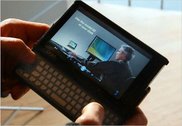
My second interest with the OQO centers on user input: its keyboard and the active digitizer on its 5 inch screen. First on keyboards. There are two camps out there in the UMPC universe. One adheres to the strict mantra that UMPC's should be keyboardless (I'm an adherent of this camp). We believe that handwriting recognition is required and that any UMPC with a keyboard is nothing more than a smaller laptop or a glorified Blackberry/PDA in the case of the thumbboard. The other camp, the side that is wrong, believes the opposite: that all UMPC's should have keyboards or at least thumbboards. I won't try to make their argument here because I haven't bothered to try to understand it although it appears that they may be winning given that the new Samsung Q1 Ultra ultra mobile PC (that's the real name) will ship very soon and it has a split thumbboard on either side of the unit, kind of like wings. There are a lot of arguments on both sides and I won't go into the details here but I figured I should try the OQO with its keyboard/thumbboard just so I can say I own one and clobber the opposing camp with the "see, I own both and I can tell you definitively that you are wrong" argument. No one in their right mind will believe that a sane person would drop over 2 grand to acquire a gadget just to say they own one to win an argument. Brilliant.

Regarding the active digitizer and the 5 inch screen that the OQO sports: I am curious as to the ideal size of a UMPC's screen. The Samsung Q1 has a 7 inch passive digitized LCD screen. I find that screen works for me when I'm not using the Q1p with an external monitor. I can view full web pages, work on Word documents and do most of my office productivity work without considerable eye strain or unnecessary scrolling about. Will reducing the screen size to 5 inches be too small? Ah, that's the question. I don't have an answer right now however there are enough reviews out there that are praising the screen on the OQO and claim that the software interpolation it uses to scale graphics up to 1024x600 is very good and quite usable. We'll see.

Active vs. passive digitizing - another war zone. I have not taken a side here yet. For those in need of a refresher course, the Samsung Q1 uses a passive or "touch" screen. This means that anything from a pen to your elbow will work on the screen. The disadvantage is that anything from a pen to your hand will also potentially screw up handwriting recognition. Because passive digitizers don't care what touches them, you can do cool things like use your finger to point and click and drag and drop. It's a cool feature. However, that same inability to distinguish your finger from a pen means that you have to be careful when you're writing to ensure that your hand doesn't touch the screen as you're writing. Otherwise, the digitizer gets confused and starts to scribble, wildly interpreting between your pen tip and the pressure points created by your hand dragging across the screen. Needless to say handwriting recognition starts to get pretty creative with its misinterpretations at this point.

Active digitizers like that found on the OQO take care of this problem by requiring a special pen to be used when writing on the screen. This magic pen is recognized by the digitizer. It uses a magnetic field to tell the digitizer when it is close to the screen (like hovering the cursor above a button) and when it is pressed down on the screen. This means that unless your finger is generating a magnetic field, it and no other object will be recognized as an input device. Drag your hand across the screen to your heart's content while writing - the digitizer will not get confused and subsequently will not misinterpret your handwriting. Nifty. Of course the drawback to active digitizers is that since your finger isn't putting out a magnetic field, you cannot point and navigate with just your finger. The digitizer won't recognize it. Nothing will happen except you'll smudge your screen.

So I'm interested in better understanding the trade offs between these two technologies. From a user experience perspective is an active digitizer better than a passive digitizer? I don't know but I'm sure I'll form an opinion after using the OQO for awhile.

And that's it. I purchased my third UMPC but I think the purchase will yield interesting use cases and answer some important questions that are still being debated about UMPC's. Also, the OQO 02 is currently the only UMPC on the market that is truly ultra mobile (in the sense that you can just pick it up and go). I'm interested in seeing how that added mobility affects my computer usage.

I look forward to sharing my thoughts with you on this blog.

Thursday, April 19, 2007

i'm a umpc convert...

From a recent post I made at Cnet.com about an article they wrote on "Why You'll Never Buy a UMPC":


granted, i am a technophile but i converted to the umpc for a couple reasons.first, i want to simplify my life. i used to have a desktop pc. i got rid of it for a laptop. the laptop performed all the tasks i needed but gave me the ability to transport my computing needs when and where i desired. the laptop was a transportable desktop. granted, the laptop didn't have the power and expandability of a desktop but the ability to move from location to lcoation trumped those benefits of a dedicated desktop. for gameplaying, i purchased an xbox 360 and suddenly there really was no need for a desktop. i replaced my vaio latop recently for a samsung q1p and have not regretted it. the samsung q1p while not as powerful as my laptop does meet at my daily computing needs just fine and does it in a smaller, more mobile package. i have the q1p connected to my 20in sony lcd monitor. i use a bluetooth keyboard and mouse and so i have basically a desktop system in a package the size of a paperback. when i need to go to a client's office, i have pop the umpc into its leather case and go. 5 seconds. i now have a laptop as the leather organizer case has an integrated keyboard. at the client, i pop the q1p out of the organizer and take it into meetings. i take handwritten notes quickly and efficiently. when i get back to my desk at the client's office, i put the q1p back into the organizer case and use it as a laptop. so the q1p has now simplified my life by acting as my desktop, laptop and ultra mobile pen based computer. all in a smaller and lighter package.

second (and i realize this is going to sound strange but it's important to me) i am on a quest to eliminate noise from my computing experience. i hate noise that eminates from technology. i work at my home office and it's quite peaceful and quiet. i spend a lot of time on my computer. the fan noise from a desktop annoys me to no end. it's constant hum continually demands attention and let's you know "hey! i'm a computer and am comsuming lots of power. so much in fact that i need this enormous fan to cool down my cpu!". i researched a lot of laptops and settled on a sony vaio b/c it had dual cores that ran cooler and a smart power management system that controlled (and allowed the user to control) the fan speed. this greatly cut down on the ambient noise of computing. however... when the fan did kick on it could be noisey. my umpc is virtually silent all the time. when the fan does kick on it is brief and quiet and doesn't remind me that my electric meter is spinning out of control.

and that brings me to my third point (which is also questionable and will cause you to roll your eyes): power consumption and the environment. i want to do whatever i can to reduce my carbon signature on the environment. i drive a hybrid, buy only the highest rated energy star appliances and have switched all my light bulbs out for fluorenscent bulbs. an extreme, i know. in any case the power footprint of a umpc is something like an order or two or three *magnitude* difference in power requirements. my umpc has a thermal rating of something like 5 watts of power. my desktop pc had a tdp of something like 95 watts. that's a big difference that was actually reflected in my power bill which dropped significantly after i replaced my desktop pc. i like the fact that i'm using technology that has significantly reduce my daily power consumption.

i've been ranting here for awhile so i'll stop with this last point: mobility. i know, a lot of people will say that a laptop is just as mobile as a umpc but my experience has been that it is not. not nearly. think about it. a laptop has a unique design that requires it to sit open with the keyboard on a flat surface and the monitor flipped up. this means that while you can transport the thing around you are really just moving from one flat surface to another. you cannot easily use a laptop while standing or while laying on the couch or in the car or while walking about. the laptop is transportable but not truly mobile. the umpc on the other hand is both transportable and mobile. because it has no keyboard you can hold it in one hand. you can stand and use it, lie on the couch and use it, walk and use it. these things sound trivial but once you are unteathered from the desktop or table you'll find that you use the umpc more - at least i do. i enjoy actually writing in my own handwriting my blog while reclined comfortably on the couch. in the morning i drink my coffee in the kitchen while reading the news in one hand. it's natural and convenient. i don't have to drag my coffee up to my office and sit at my desk to get my morning started. the screen is not so small that it is unusable and not so big that it is unmobile. its form factor meets the needs of a new generation of mobile computing that i think people will embrace because it is where we are heading.

i believe the umpc will replace the notebook in the long term. as processors reduce in size and increase in performance and other technologies like samsung's new led screens reduce power requirements and battery technology improves, we'll find that umpcs can do everything that we need them to so and give us the benefits of truly mobile computing. current generation umpcs are just the start but if they are any indication of where things are headed then i think computing is heading in the right direction.

just my 1.5 cents.

cheers everyone,

neil