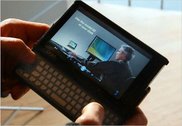
Broke Down… Ordered the OQO 02

After some deliberation I decided to break down and buy an OQO model 02.
Now I know, I just bought my Samsung Q1… actually, between the last blog posting and this one, I purchased another Samsung Q1 but this time the Q1p which is the upgraded Pentium M processor and memory (I gave my original Q1 to my sister). In any event, I love my Q1p. Really, it is a desktop and laptop replacement and I couldn't possible hope for anything better.
So why did I buy the OQO 02? Well, for one thing I had to. The thing is just too sexy. Another reason is that… oh forget it. There is no other reason. I won't pretend to have some "really good reason" for buying something so expensive after I have just purchased another something that was a little less expensive to replace an original spur of the moment purchase of something expensive that I didn't need.
The end result is that it will be arriving sometime in the next two weeks, provided OQO meets the scheduled and promised dates to get Vista-fied OQO's out the door next week. And, this lead me to the main thrust of the posting: Given that I'm now committed to the OQO, how do I hope to use it and what does it mean to this brave new world of UMPC's?
Believe it or not I waffled for days back and forth on weather to purchase the OQO. I mean, I have an almost perfect setup now with the Samsung Q1p.
But…
The purpose of the UMPC initiative is to make computing ULTRA mobile and while the Q1p is very mobile, the OQO is half the size of the Q1p and theoretically should be that much more mobile.
By "more mobile" I mean that the thing is small enough to put in your pocket or drop in your man-purse. The Q1p just isn't that small so while I can easily carry it around the office or the house, I'm not apt to just grab it like my mobile phone when I go out. With the OQO this will theoretically happen… we'll see. If it does happen, then new use cases should pop out of the added mobility. I'm interested in these use cases and the implications they have on the hardware design of UMPCs as well as the software/solutions that might reveal themselves.
That's my first great interest.
My second interest with the OQO centers on user input: its keyboard and the active digitizer on its 5 inch screen. First on keyboards. There are two camps out there in the UMPC universe. One adheres to the strict mantra that UMPC's should be keyboardless (I'm an adherent of this camp). We believe that handwriting recognition is required and that any UMPC with a keyboard is nothing more than a smaller laptop or a glorified Blackberry/PDA in the case of the thumbboard. The other camp, the side that is wrong, believes the opposite: that all UMPC's should have keyboards or at least thumbboards. I won't try to make their argument here because I haven't bothered to try to understand it although it appears that they may be winning given that the new Samsung Q1 Ultra ultra mobile PC (that's the real name) will ship very soon and it has a split thumbboard on either side of the unit, kind of like wings. There are a lot of arguments on both sides and I won't go into the details here but I figured I should try the OQO with its keyboard/thumbboard just so I can say I own one and clobber the opposing camp with the "see, I own both and I can tell you definitively that you are wrong" argument. No one in their right mind will believe that a sane person would drop over 2 grand to acquire a gadget just to say they own one to win an argument. Brilliant.
Regarding the active digitizer and the 5 inch screen that the OQO sports: I am curious as to the ideal size of a UMPC's screen. The Samsung Q1 has a 7 inch passive digitized LCD screen. I find that screen works for me when I'm not using the Q1p with an external monitor. I can view full web pages, work on Word documents and do most of my office productivity work without considerable eye strain or unnecessary scrolling about. Will reducing the screen size to 5 inches be too small? Ah, that's the question. I don't have an answer right now however there are enough reviews out there that are praising the screen on the OQO and claim that the software interpolation it uses to scale graphics up to 1024x600 is very good and quite usable. We'll see.
Active vs. passive digitizing - another war zone. I have not taken a side here yet. For those in need of a refresher course, the Samsung Q1 uses a passive or "touch" screen. This means that anything from a pen to your elbow will work on the screen. The disadvantage is that anything from a pen to your hand will also potentially screw up handwriting recognition. Because passive digitizers don't care what touches them, you can do cool things like use your finger to point and click and drag and drop. It's a cool feature. However, that same inability to distinguish your finger from a pen means that you have to be careful when you're writing to ensure that your hand doesn't touch the screen as you're writing. Otherwise, the digitizer gets confused and starts to scribble, wildly interpreting between your pen tip and the pressure points created by your hand dragging across the screen. Needless to say handwriting recognition starts to get pretty creative with its misinterpretations at this point.
Active digitizers like that found on the OQO take care of this problem by requiring a special pen to be used when writing on the screen. This magic pen is recognized by the digitizer. It uses a magnetic field to tell the digitizer when it is close to the screen (like hovering the cursor above a button) and when it is pressed down on the screen. This means that unless your finger is generating a magnetic field, it and no other object will be recognized as an input device. Drag your hand across the screen to your heart's content while writing - the digitizer will not get confused and subsequently will not misinterpret your handwriting. Nifty. Of course the drawback to active digitizers is that since your finger isn't putting out a magnetic field, you cannot point and navigate with just your finger. The digitizer won't recognize it. Nothing will happen except you'll smudge your screen.
So I'm interested in better understanding the trade offs between these two technologies. From a user experience perspective is an active digitizer better than a passive digitizer? I don't know but I'm sure I'll form an opinion after using the OQO for awhile.
And that's it. I purchased my third UMPC but I think the purchase will yield interesting use cases and answer some important questions that are still being debated about UMPC's. Also, the OQO 02 is currently the only UMPC on the market that is truly ultra mobile (in the sense that you can just pick it up and go). I'm interested in seeing how that added mobility affects my computer usage.
I look forward to sharing my thoughts with you on this blog.