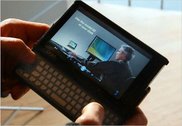
OQO Model 02 Review Part 1: Form Factor
Dimension and volume
- OQO is the definition of "ultra-mobile"
The OQO model 02 is quite compact and small. It is less than half the size of my Samsung Q1 P and weighs about 50% less. This means the unit can be picked up as quickly as a mobile phone as you're heading out of the house. The OQO's size is one of the main reasons why I purchased the unit and I'm happy to say I'm actually carrying it around with me almost everywhere I go.
Is the OQO's ultra-mobility useful?
You bet. Here's an example of how size matters. The other day, I was called into an impromptu meeting. We met in an office where there was no network connectivity. There were 4 other people in the meeting, none of whom brought their laptops. During one part of the meeting we were reviewing a bug list for a software product. All of us were given printouts. The printouts did not contain all the needed information. Normally, the meeting would have adjourned but because I had my OQO with Sprint, I was able to log onto the VPN and bring up the detailed bug reports from the website. We breezed through the bugs, completed business and adjourned.
The fact of the matter is that people prefer not to carry around their laptops. They like to transport them from home and work and then back again but generally, once a laptop is docked, it stays docked until the next transport. My experience has been that the OQO's size makes it more likely for me carry it around at all times and that is when interesting use cases come up.
Construction quality
- Quality craftsmanship
- Solid and durable
The unit feels solid and durable. There is a high-quality of craftsmanship throughout - no cheap plastic here. The unit is tight. Gaps and tolerances are amazingly fine and consistent. The sliding mechanism on the screen just feels great. The magnesium alloy body hides scratches and blemishes very well. The screen comes with a pre installed screen protector, which is a nice touch. There are nice touches all around: from the elegantly designed cooling grids to the noticeable lack of "VIA Inside" , "Genuine Windows Vista" and "Windows Vista product key" stickers.
Screen
I've gotta talk about the OQO's screen. I was skeptical about its size and quality even after reading rave reviews about the screen. I was coming from a 7 inch screen on the Samsung Q1P and that's a nice screen size. But surprisingly the 5 inch screen on the OQO's simply looks exceptional. It is bright and extremely readable. It's clear that you're dealing with a premium LCD screen. While text is naturally smaller on the 5 inch screen compared with 7 inch screen I can still comfortably read web pages with the OQO sitting on my lap.
Here's the second biggest reason why I bought the OQO: it sports a flush screen with no extraneous controls to disrupt handwriting. This means you have an exceptionally smooth and uncluttered surface on which to write which is critical in pen computing. One of the biggest problems I have with my Samsung Q1 P is its bevel and its pseudo joystick on the left. Being a left hander, I find myself hitting the pseudo joystick in the middle of writing and moving the cursor to a new insertion point or form field. This is not a problem on the OQO. Writing on the OQO is smooth, silky and just like writing on a 5 inch notepad.
The OQO sports an active digitizer versus a passive (a.k.a. touch screen) digitizer like the Q1P. I would take the active digitizer over the touch screen any day. If you pen a lot, you'll appreciate the active digitizer on the OQO. You can rest you hand on the screen without worrying about vectoring. This is more natural and comfortable during longer periods of note taking.
No integrated stands
One thing I really like about my Samsung Q1p are the two stands integrated into the back of the unit. Samsung designed them in a way where they do not add any additional depth to the unit. There is an 80° stand for working with the Q1P as a notebook and a 20° stand for working in pen mode. In 20° mode, the Q1 lays almost flat on a desk but is propped up just slightly to make it easier to jot down notes. Perfect for meetings.
I don't find much need for a 20° stand on the OQO . Simply lay the unit down on a flat surface and write on it. It's no different than writing on a 5-inch note pad.
Would a 80° stand be useful for OQO? Yes. Without the dock, there is no easy way to use the OQO in notebook mode. You can carry around a cheap book stand (the kind found in Barnes and Noble) or you can purchase the Stowaway Bluetooth keyboard which has a stand that attaches to the keyboard. Either way, it's just another something to lose.
No integrated pen holder
Some people have a problem with the Tablet and Vista versions of the OQO not having an integrated pen holder. However, here's the tradeoff: The OQO's pen is a real pen, not a tiny, toothpick-like stylus. The designers at OQO could have integrated a slot for a tiny stylus but I think their decision not to is the right one. Having used the tiny stylus on the Samsung Q1, I can tell you writing with a full sized pen feels better. It is has better ergonomics and I tire less quickly. I would take a full sized pen over a pen holder. Besides, the belt clip case does have a pen holder and I believe this case ships with the XP Tablet PC edition of the OQO.
Ergonomics
- Easy, even natural to hold in portrait mode
- Not-so-easy to hold in landscape mode (pen mode)
- Difficult to hold when the power supply is connected
- Nice keyboard and track stick
Most of the time I use the unit docked. When I do undock it, I generally use the pen as my primary mode of input and not the keyboard. This is faster and more comfortable for me.
I generally ink in portrait mode. I find the OQO's form factor ideal for portrait mode. I can easily hold the unit in one hand like a note pad and write with the other. In 800x480 mode, I have plenty of vertical space and Vista's auto-expanding TIP uses all that space as I need it. I never feel cramped and the bright, readable screen is easy on the eyes.
The vent placements also work for me. Holding the unit in my right hand, my thumb only partially covers the long intake on the right side. The exhaust vent on the left side is above my grip and so I never feel the exhaust.
Weight distribution in portrait mode is great. My hand does not tire and I do not feel a need to shift my grip.
Note taking in landscape mode is not as easy. The OQO's weight distribution makes it difficult to find a comfortable place to grip. There is no affordance on the unit to facilitate holding. While straight, clean lines are pretty and all, they are not ideal from an ergonomic standpoint.
Still, it is easier to hold the OQO in one hand than a larger 7 inch device. Larger devices have more weight hanging out beyond your grip which can create an uncomfortable leverage point on your wrist. This is not really a problem on the OQO.
There's been a lot of talk about the keyboard on the OQO - mainly praise for its improvements over the model 01. Having never used a model 01's keyboard I cannot attest to that. However, I can say that the quality of craftsmanship on the keyboard and thumbstick are superb. Truthfully, I hardly use the keyboard except for passwords and to change the screen brightness.
Speaking of screen brightness, it would have been nice if OQO included an on-screen menu to control commonly used functions like screen brightness and volume. The Samsung Q1 has such a menu that is easily accessible and I use it a lot. OQO, you listening?
Fan noise
Let's face it: the law of thermodynamics is not working in the OQO's favor. Heat drops off by a power of 3, the further it moves out from its source. A small increase in this distance results in a significant reduction in heat. Conversely, a small decrease in the distance results in a significant increase in heat. While the VIA process is amazingly efficient (the C7-M has a maximum thermal design power (TDP) rating of something like 10 watts), its diminutive size confines even that little bit of heat into a very small space. Heat builds up quickly and so a fan is needed to push it out of the unit.
In any case, enough of basic thermodynamics. We're talking UMPCs here. The bottom line is this: The OQO is noisier than I would like. It is noisier than the Samsung Q1 by quite a bit. However, I am willing to live with it.
Firstly, the fan only revs up when needed. The moment the OQO can turn it down, it does. This results in brief bursts of higher fan speeds, usually when opening an application or when visiting cnet.com (no kidding. Cnet needs to optimize their site. All that Flash and heavy DHTML consumes cpu cycles. Multiple those cpu cycles by the TDP of those processors times the number of people visiting Cnet and you get a lot of wasted wattage which is bad on the environment).
Anyways, I digress. The point is that the fan noise is not that bad really. Additionally, OQO has provided a nifty control panel that let's you adjust the fan for either performance (more noise) or silence (less performance). Find the value that's right for you. What I do is keep the slider right in the middle and then use Vista's power management to throttle back the cpu. When I really want it quiet, I go into Power Saver mode which throttles the cpu back to 50% and hushes the OQO down pretty quickly.
Conclusion
The OQO's form factor is ideal for my needs. It is small enough to carry around like a PDA but has a large enough screen to be readable and useful. Quality and craftsmanship are high. You would expect this given the premium price of the OQO. While the integrated keyboard is much improved over the model 01, I find inking more natural. Inking in portrait mode is the best I have seen. It's form factor is ideal for this. Fan noise can be a problem but generally the OQO does a good job of minimizing the amount of time the fan stays revved up. User control of the fan is a nice touch.
In Part Two of this review, I will dive into inking and using the OQO as a pen tablet.